
Upgrading from Drupal 10 to Drupal 11: what actually changes
Drupal 11 is a far smaller step than the Drupal 7 to 9 migration was. Here is what the upgrade touches, what breaks, and the order to do it in.
ZooBieDoo Infotech Engineering TeamRead
Both are mature and both are capable. The decision should follow how structured your content is, how complex your permissions are, and who has to maintain it in three years.
“Which is better, Drupal or WordPress?” has no useful answer, in the same way that “which is better, a van or a saloon car” has none. Both are mature, both are open source, both run very large sites. They optimise for different things.
The useful question is narrower: how structured is your content, how complex are your permissions, and who maintains this in three years? Almost every sound decision follows from those three answers.
WordPress is built around posts and pages, with custom post types and fields available through plugins. That model is a good fit for content-led marketing sites, publications and brochure sites where most items look broadly alike.
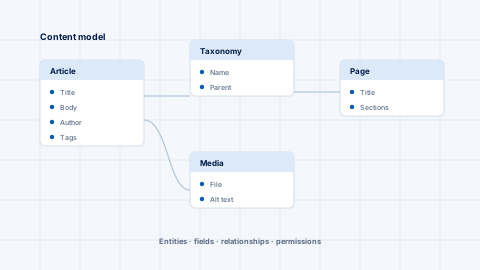
Drupal treats structured content as the default rather than an addition. Entities, fields, taxonomies and relationships are core concepts, and modelling them properly is the first task in any serious build. That pays off when your content genuinely has structure — products with specifications, courses with prerequisites, properties with attributes, services in several languages.
A reasonable test: sketch your content types and their relationships on paper. If it fits comfortably into posts, pages and a couple of custom types, WordPress will serve you well and cost less. If the sketch turns into a diagram with relationships and inheritance, Drupal's model will save you from rebuilding it in plugins.
The second deciding factor is who is allowed to do what. WordPress ships with a small set of roles that covers most editorial teams. Drupal offers granular per-entity, per-field permissions and configurable editorial workflows out of the box.
If your organisation needs regional editors who can publish in their own section but only draft elsewhere, a legal review step before anything goes live, or an audit trail of who changed what, Drupal handles that natively where WordPress needs additional plugins — and each plugin is a long-term maintenance and security commitment.
Multilingual delivery is a similar story. Drupal's translation handling is part of core and covers interface, content and configuration. It is one of the clearest cases where the heavier framework repays its cost.
Whichever you choose, the real cost is maintenance. Both projects publish security advisories, and both require someone to act on them.
Two habits matter more than the choice of platform:
If you are on Drupal 7, note that it has reached end of life. Moving to Drupal 10 or 11 is a migration rather than an upgrade — content and configuration are mapped onto a fresh build — and it is worth planning deliberately rather than deferring.
Keep reading
Drupal 11 is a far smaller step than the Drupal 7 to 9 migration was. Here is what the upgrade touches, what breaks, and the order to do it in.
Most difficult Drupal builds are content-modelling failures, not code failures. How to model entities, fields and taxonomies so a site stays maintainable.
Drupal has a strong security team and a predictable advisory process. The risk on most sites is not the platform, it is that nobody is watching the advisories.